Skip to content

System consolidation & technology selection

Check what your new system can keep before you switch

A replacement covers the main features but has nowhere for essential history or business rules. Your staff find the gap only after switching. We test typical data and workflows, then document your options and unresolved limits before your team commits.

Discuss this problem

How We Help

We agree on which links between records, history, and decision rules must stay usable. Safe real-world examples give better proof of fit than broad feature labels. We compare what your current system can export with what the new one can actually import and the extensions it supports. Gaps may call for new settings, a maintained connection, or an archive people can reach, and some may justify another tool. Your owners approve the tradeoffs using a written review. It explains how routine work and access to past records would change under each practical option.

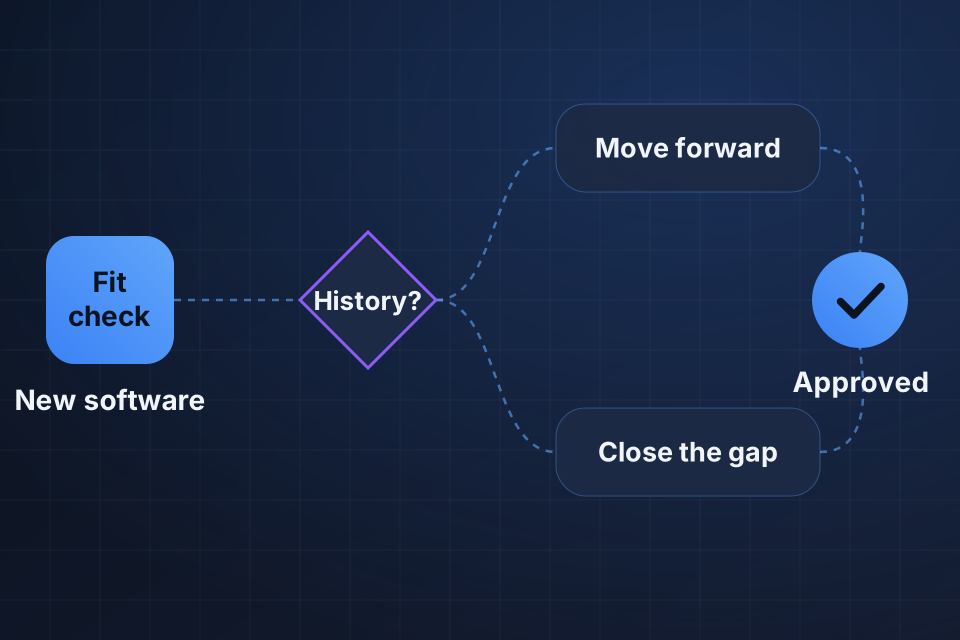
Diagram of a replacement software check that moves forward only when history and business rules are kept or gaps are closed.

Signs This Is the Problem

History has nowhere to go

The new system accepts customer records but can't hold the history and links you need. Your staff find the missing context when serving an existing customer, even though the visible contact data seemed to move without trouble.

Important rules become manual work

Approvals or pricing rules become repeated manual work in the new tool. The feature name got replaced, but the way it actually worked did not survive the proposed change in workflow.

A demo hides migration constraints

A demo never shows typical imports and exceptions. Your decision-makers have no proof that important cases will work with their real data, even though the product looks suitable in a simple vendor example.

What We Investigate

Inventory must-preserve information

We identify the history and links you must keep, working with the people who use them. Ongoing daily needs and retention rules decide which information must stay within reach, whether inside the new system or in an approved archive.

Test representative business rules

Next, we test typical rules using safe examples and what the product actually supports. Exceptions reveal gaps a normal demo can hide, including approval, pricing, or ownership rules your routine work depends on.

Assess export and destination fit

We compare what your current system can export with what the new one can import, and with the extensions you could maintain. A proposed transfer needs proof that required fields and links can actually be held or kept.

What We Repair

Produce a supported fit assessment

For your selection decision, we document what fits, the gaps we tested, and what depends on what. Working examples stay separate from unresolved needs, so the owner can judge the real tradeoff and not an assumed complete replacement.

Design an approved preservation approach

For required history the new system can't hold, we design an approved transfer or an archive people can reach. We test retrieval against the business task, not merely whether a set of exported files exists.

Resolve critical rule gaps before commitment

We compare settings, a scoped connection, and other tools for critical rule gaps. Your owners approve the option you can maintain before you commit, and the proposed process states any remaining manual steps openly.

How We Verify the Fix

  • A typical customer's required links stay usable through the proposed transfer or archive.
  • Critical approval or pricing examples follow the supported workflow in the new system.
  • Export and import evidence supports the agreed data model without assuming fields that aren't available.
  • The decision record names unresolved gaps and the approved workaround for each.

Questions About This Work

Does this always require custom development?

No. Some gaps fit supported settings or a retained archive without custom work. A custom route should follow a proven need and a design you can maintain. We compare those options, and we don't use code to make up for a new system whose basic fit was never tested.

Can a vendor demonstration prove suitability?

Not on its own. A demo is useful when it includes typical records and exceptions from your process. We also inspect evidence of what can be transferred. Broad feature claims don't show that your existing links or business rules can move into the product in a usable form.

Who makes the final selection?

Your business owners approve the final tradeoffs. We provide practical evidence you can compare, and we make kept needs and gaps clear. The decision should reflect the effect on daily work and access to past records. It should not assume that a good feature demo settles every dependency.

Tell Us What Is Happening

Name the current and proposed platforms. Share one link between records or one business rule, with sensitive details removed, that the new system can't hold. We can then test the need and identify a supported way to keep it.

Explore System Consolidation More problems in System consolidation & technology selection

Ready to Get Started?

Tell us about your project and we'll get back to you within 24 hours.